The best Transport Fever 3 vehicle is the one that fits the cargo or passenger job, the infrastructure, and the observed constraint on your line. Start by filtering out incompatible vehicles, then compare complete operating vehicles by capacity, loading speed, cost, comfort, pollution, noise, and relevant technical data. After purchase, verify the choice with utilization, frequency, rate, condition, and annual balance rather than assuming that a newer or faster model is automatically better.
The key limitation is that the store describes vehicle capabilities, not the result the vehicle will achieve on your route. A high top speed may be wasted on a short service with frequent stops, and a large nominal capacity does not help when vehicles leave mostly empty. Trains and trams add another comparison trap: you must evaluate the complete consist, not one locomotive, coach, wagon, or tram car in isolation.
Use a constraint-first vehicle selection process
Choose the vehicle only after defining what must improve. This prevents an unlock notification, an attractive model, or one green statistic from becoming the reason for an expensive fleet change.
- Define the transport job. Decide whether the line will carry passengers or cargo, identify the required cargo type where applicable, and confirm the transport mode and facilities available along the route.
- Inspect the current service. Check whether the existing problem is insufficient capacity, poor utilization, slow loading, unsuitable cargo support, high running cost, weak passenger comfort, town-impacting noise or pollution, or an infrastructure mismatch.
- Filter to compatible candidates. Remove any vehicle that cannot carry the required cargo or cannot use the available terminal, depot, landing, or airport facilities.
- Compare the full operating unit. For buses, trucks, ships, planes, and helicopters, examine the self-contained vehicle. For trains and trams, assemble and compare the entire consist.
- Check both upfront and continuing cost. Keep purchase cost separate from maintenance or running cost, and calculate the effect across the number of vehicles you actually intend to buy or replace.
- Buy only what the route can use. Extra capacity, loading performance, or speed has value only when it addresses the constraint you identified.
- Measure the result after deployment. Use the vehicle and line statistics to see whether utilization, rate, frequency, and balance changed in the intended direction.
This process can validly end with keeping the current fleet. If the existing vehicles remain compatible, adequately utilized, and suitable for the route, a newly available replacement may not solve a real problem.
Filter the vehicle store before comparing specifications
The vehicle store changes slightly by vehicle type. Trucks, buses, ships, planes, and helicopters operate on their own and therefore use the simpler store layout. Trains and trams can be assembled into consists, so their store includes additional controls for selecting and arranging units.
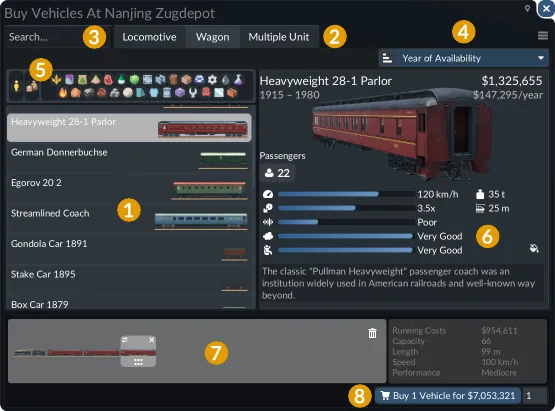
Vehicle Store Window
Use the store controls in an order that narrows the list efficiently:
- Select the relevant category tab when the store offers categories. The train store, for example, separates locomotives, wagons, and multiple units.
- Use search when you already know part of a model or unit name.
- Apply the cargo buttons before comparing freight vehicles. You can select one or several cargo types; the resulting list shows vehicles able to transport all selected types.
- Choose a useful sort property and confirm whether the order is ascending or descending.
- Open each plausible candidate’s detailed panel instead of deciding from the list row or vehicle image.
The selected vehicle’s card shows cost, maintenance cost, availability, and cargo specialization. Its detailed table can include pollution, noise, passenger comfort, loading speed, and technical properties. Treat these fields as a set: a candidate is usable only if it passes every requirement that matters for the route.
For cargo services, compatibility is the first gate. Do not buy a high-capacity freight vehicle until its cargo symbols and labels confirm that it can carry the product the line will collect. Check every stage of a journey that changes transport mode, because a compatible wagon does not prove that the truck, ship, or other onward vehicle is compatible too.
For passenger services, capacity is only one part of the decision. Comfort, loading performance, purchase cost, continuing cost, and properties that may affect town ratings can all influence the better choice. The store supports this comparison, but it cannot determine how much demand the line will receive.
Compare complete vehicles by the job they must perform
Use the same comparison fields for every candidate, but give the most weight to the field connected to the route’s actual constraint.
| Comparison field | What to verify | When it becomes decisive |
|---|---|---|
| Cargo support | The vehicle supports every cargo type assigned to its part of the route | Before any freight purchase |
| Capacity | The capacity belongs to the complete operating vehicle or assembled consist | When current vehicles are regularly unable to carry the available load |
| Loading speed | The vehicle’s loading properties suit the cargo and station setup | When terminal time is limiting service movement |
| Technical data | The relevant capability fits the infrastructure and route | When the route can actually use that capability |
| Passenger comfort | The candidate’s comfort fits the passenger service being planned | When comparing passenger alternatives |
| Pollution and noise | The displayed values are acceptable for where the service operates | When vehicles run through areas where town ratings matter |
| Purchase cost | The full transaction is affordable for the intended quantity | Before confirming a new fleet or replacement |
| Maintenance cost | The continuing fleet-wide cost is sustainable | When comparing vehicles that could perform the same job |
| Availability | The candidate is available in the current game | Before building a plan around it |
| Specialization | Vehicle, terminal, and warehouse specializations align where relevant | When loading performance is important |
Avoid comparing candidates that represent different units of measurement. One wagon is not a complete freight train, and one tram car is not necessarily the full tram that will operate. Similarly, compare the total capacity and cost of a large vehicle with the combined capacity and cost of the smaller vehicles needed to provide the alternative service pattern.
Nominal capacity also differs from delivered capacity. Several smaller vehicles and one larger vehicle may move a similar theoretical amount while producing different frequencies. The store can reveal their costs and capacities, but only the operating line can show how the chosen pattern interacts with actual demand.
Evaluate trains and trams as complete consists
Train and tram stores let you combine units and modify their order in the lower part of the window. Build the intended consist before judging its capacity, cost, or suitability.
For a powered-and-towed formation, inspect both sides of the combination. A locomotive’s capability does not make every attached coach or wagon equally suitable. Check the passenger or cargo role of the attached units, their supported cargo where relevant, and the technical values that may constrain the assembled vehicle. A faster locomotive is not a useful upgrade if another part of the consist or the route prevents the service from benefiting.
Apply the same rule to multi-car trams. A catalog value for one car should not be compared with the total value of a complete bus or another fully assembled tram. First assemble the formation you would operate, then compare its total capacity and complete cost with the alternative.
Cargo-capable trams can be included when their supported cargo, connected route, and facilities match the job. They are an option to compare, not an automatic replacement for trucks or conventional freight trains. Include the required infrastructure and continuing operating cost in the decision.
Train buying becomes much easier when you use this sequence:
- Choose the passenger or freight job.
- Filter freight units by the required cargo types.
- Assemble a complete consist that can perform that job.
- Check the relevant specifications of the locomotive, coaches, and wagons together.
- Compare the complete formation with another complete formation.
- Confirm that its length and operating requirements fit the stations and route where it will run.
Match speed, capacity, and loading to the route
Speed should be evaluated in the context of the route. A high maximum speed is a capability, not a guarantee that the vehicle will sustain it. Short distances, frequent stops, curves, and traffic can reduce how much of that capability becomes useful. On a stop-heavy service, capacity or loading performance may matter more. On a longer, clearer route, additional speed may have more opportunity to affect the service.
Capacity should begin with observed demand. If vehicles commonly depart with unused space, a larger replacement requires a specific justification. If the available load regularly exceeds the fleet’s capacity, additional capacity may address a real constraint. Use the operating statistics rather than judging demand from a single vehicle at a single moment.
Loading performance depends on more than the vehicle card. The vehicle has a base loading speed, while its loading speed for a cargo type is shown as a percentage in the vehicle window. Vehicle specialization, terminal specialization, and, where applicable, warehouse specialization can modify the result. Matching specializations provide a bonus, while mismatches apply a penalty.
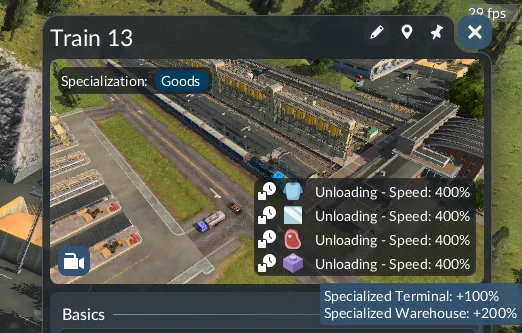
Inspect the displayed unloading modifiers for the cargo being handled.
Platform length is another required check for trains and trams. If the platform is shorter than the vehicle using it, loading and unloading are slowed. The vehicle window, station window, and terminal-selection dialog display a warning when this occurs. Buying a better-loading or longer consist without checking platform length can therefore leave the original delay unresolved or introduce a new one.
While a vehicle is loading, the loading indicator shows whether the current rate is normal, increased, or decreased. Hover over the cargo’s loading status for a detailed breakdown of the loading speed and its modifiers. This is the appropriate place to distinguish a weak vehicle choice from a specialization or platform problem.
Check mode-specific facility compatibility
A suitable specification is irrelevant if the vehicle cannot use the available facilities. Verify the complete operating path before purchasing.
Large ships require large harbor landings. Harbors do not divide their terminals into separate passenger and cargo types, but landing size still limits which ships can stop. Confirm the landing rather than assuming every ship shown in the store can use the existing harbor.
Airfields serve smaller planes, while airports support all plane types and helicopters. Airports include aircraft hangars, and dedicated heliports include the helicopter-only depot required to purchase helicopters. Smaller helipads provide landing and takeoff locations but are not a substitute for that purchasing depot. These facility distinctions should be checked before treating an aircraft or helicopter as a viable route candidate.
Depot reachability also matters. Vehicles cannot be transferred directly from one depot to another, so buy a vehicle in a depot from which it can reach its intended destination. A vehicle sent back to a depot goes to the nearest reachable depot rather than necessarily returning to the depot where it was purchased.
Calculate the fleet cost instead of reading one price
Purchase cost and maintenance cost answer different questions. Purchase cost is the immediate commitment; maintenance or running cost continues while the vehicle operates. Compare both for candidates that can perform the same job.
For a simple budgeting comparison, use the same time period for each candidate:
purchase cost + annual running cost × comparison years
This is a budgeting illustration, not a profit forecast. Demand, income, condition, and later network changes still affect the result. Its purpose is to stop a low purchase price from hiding a high continuing cost, or a manageable per-vehicle expense from hiding an unaffordable fleet-wide commitment.
Run the comparison using the quantity you intend to operate. If one candidate needs several vehicles to provide the desired capacity or frequency, add their purchase and running costs together. For a train or tram, include the complete formation rather than only the powered unit. Leave enough money for the rest of the network instead of treating the ability to buy one example as proof that a full-line replacement is affordable.
A strategically useful route may not immediately recover every investment, but its cost should still be visible before more vehicles are added. The annual balance in the operating statistics provides the evidence needed for that later review.
Verify the purchase in the vehicle details window
The vehicle details window connects the store specification to real operation. It shows the assigned line, the line’s rate and frequency, current load and capacity, condition, balance, and action controls. The camera area also reports the current movement or loading state and shows the vehicle’s specializations.
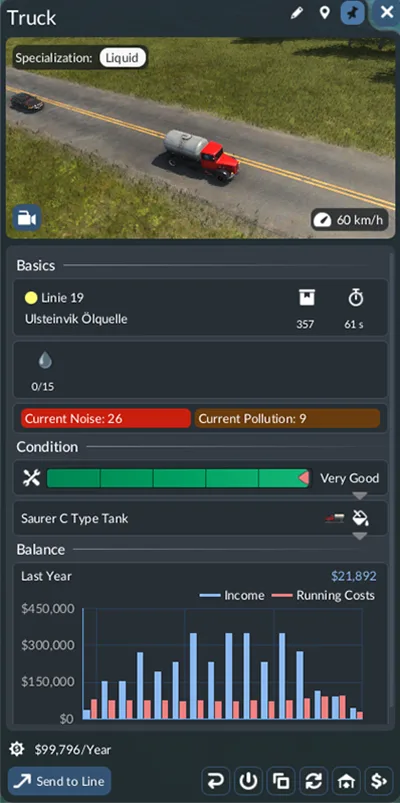
Vehicle Details Window
Use it to answer four questions after deployment:
- Is the vehicle carrying what it was purchased to carry? Check the current load, capacity, and displayed specializations.
- Is the line using the vehicle effectively? Read the line’s rate and frequency alongside the current load rather than relying on capacity alone.
- Has condition changed the expected performance? Expand the condition information to see maintenance history, model information, and current stat modifiers.
- Is the vehicle paying for its operation? In the balance graph, blue bars higher than red bars for a year indicate profitable operation for that vehicle.
Do not diagnose a fleet from the specification card alone. A vehicle can be technically suitable but underused, assigned to the wrong line, affected by condition, or attached to a service whose demand does not justify it.
Audit the whole fleet with vehicle and line statistics
The vehicle statistics table is the fastest place to find weak or mismatched purchases across a larger network. It includes each vehicle’s model, line, current cargo, load, capacity, utilization, satisfaction, condition, age, annual balance, and displayed problems. Search by vehicle or line name, then sort by the field connected to the issue you are investigating.
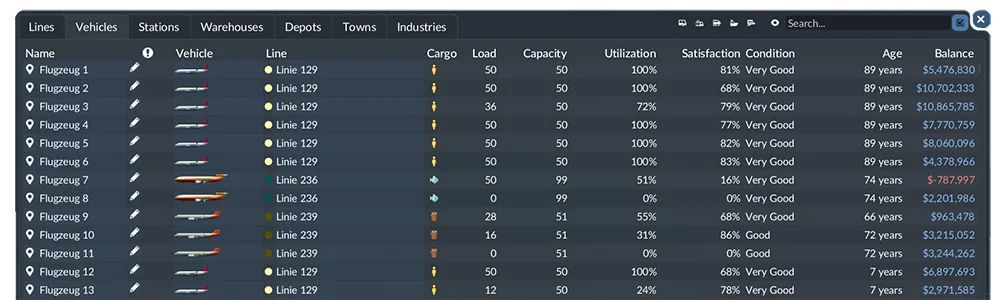
Vehicle Statistics
Use low utilization to identify vehicles whose nominal capacity may be unnecessary, but confirm the pattern over the relevant service before changing the fleet. Use negative annual balance to find costly operations, then inspect the line and vehicle details to determine whether the vehicle choice, service pattern, demand, or another condition explains the result. Treat problem warnings as investigation starting points rather than automatic instructions to replace the vehicle.
The line statistics provide the complementary service-level view. Their capacity figure combines all vehicles on the line, utilization measures use of that combined capacity, frequency shows the real-time interval between vehicles at normal game speed, and rate reports the average yearly amount transported per station. The balance column gives the line’s current annual profit or loss.
Together, the two tables separate different decisions:
- Change the vehicle type when the current model is incompatible or its relevant properties do not fit the job.
- Change the fleet size or service pattern when the model is suitable but line-level capacity, utilization, frequency, or rate is the problem.
- Investigate infrastructure or loading setup when compatible vehicles are slowed by short platforms or specialization mismatches.
- Keep the current fleet when it performs the required job and the proposed replacement does not address an observed constraint.
Replace or rearrange vehicles without changing the wrong fleet
The vehicle-management controls can act on one or multiple selected vehicles. Selecting a line or depot automatically selects its vehicles and adds them to the list, so verify the selection before applying a fleet-wide action.
Available actions depend on vehicle type and on whether the vehicle is running or waiting in a depot. They can include assigning selected vehicles to a line, selling them, sending them to a reachable depot, rearranging or extending trains, completely replacing vehicles, cloning a vehicle in a compatible depot, changing colors, reversing travel direction, or stopping selected vehicles.
Before replacement, confirm three things:
- The selected vehicles are exactly the fleet you intend to change.
- The displayed amount and quantity represent the complete transaction you are about to approve.
- The replacement can carry the required load and reach the intended service from a compatible depot.
Cloning also requires a reachability check. A clone is created in a compatible depot, but that depot may not be connected to the cloned vehicle’s line. Treat cloning as duplication of the vehicle configuration, not proof that the copy can enter the same service.
Diagnose a disappointing vehicle choice
When a newly purchased vehicle does not improve the route, check the following causes in order:
- Wrong cargo support: Reopen the vehicle information and confirm the cargo symbols and labels for the product being offered.
- Partial-unit comparison: Confirm that you compared a complete train or tram with another complete operating vehicle.
- Unused capacity: Review vehicle and line utilization to see whether the route has enough demand for the larger vehicle.
- Speed that the route cannot exploit: Consider route length, stopping pattern, curves, and traffic before attributing weak results to the vehicle’s maximum speed.
- Short platform: Look for the warning shown when a train or tram is longer than its platform.
- Specialization mismatch: Inspect the loading-speed breakdown for vehicle, terminal, and warehouse modifiers.
- Wrong facility size or type: Verify large-ship landings and the correct airfield, airport, hangar, heliport, or depot requirements.
- Condition effects: Expand the condition panel and inspect current modifiers rather than comparing current operation with an untouched store value.
- Fleet-wide cost overlooked: Multiply continuing cost across the actual quantity and include all units in a consist.
- Wrong vehicles selected for replacement: Recheck the selected line, depot, vehicles, quantity, and confirmation amount.
The final decision rule is simple: buy or replace a vehicle only when it is compatible, reachable, affordable as a complete operating fleet, and connected to a measured route need. Then use the vehicle and line statistics to confirm that the change solved that need.