
A Transport Fever 3 seed is the randomization key used when a map is generated. Entering the same seed can recreate the same map, but only when the accompanying generation settings are also the same. The seed alone is therefore not a complete map recipe.
For reliable reproduction, record the seed together with the map size, map format, climate, terrain generator, terrain parameters, and relevant civilization settings. If you are working in the Map Editor, also record which existing layers were preserved. Town and industry placement tools have their own seeds and settings, separate from the seed used to generate the terrain.
What a Transport Fever 3 seed controls
The seed supplies a repeatable value to the selected random map generator. When both the seed and the generator settings match, the game can create the same generated map again. Changing a setting changes the generation request, so reusing only the seed is not enough to guarantee a match.
This relationship is easier to understand if you treat a generated map as the result of several inputs rather than one code:
| Input | Why it belongs in the map recipe |
|---|---|
| Seed | Provides the randomization key used by the generator. |
| Map size | Defines the dimensions available to the generator. |
| Map format | Defines the map's side ratio. |
| Climate | Determines which climate-specific map generator is available. |
| Terrain generator | Selects the generator that creates biome regions, the heightmap, trees, and rocks. |
| Terrain parameters | Adjust the selected generator's output. Different generators can expose different options. |
| Civilization settings | Configure names, town density, industry density, and the start year. |
| Environment settings | Define the initial weather, time-of-day mode, and tutorial choice for the session. |
The practical rule is simple: share the complete setup, not an isolated seed value. Two players can enter the same seed and still receive different results if they select different map dimensions, climates, generators, or generator parameters.
Record the complete generation setup
Before creating a map that you may want to reuse or share, make a settings record while the generation screen is still available. This prevents a memorable landscape from becoming impossible to reproduce because one slider or dropdown was forgotten.
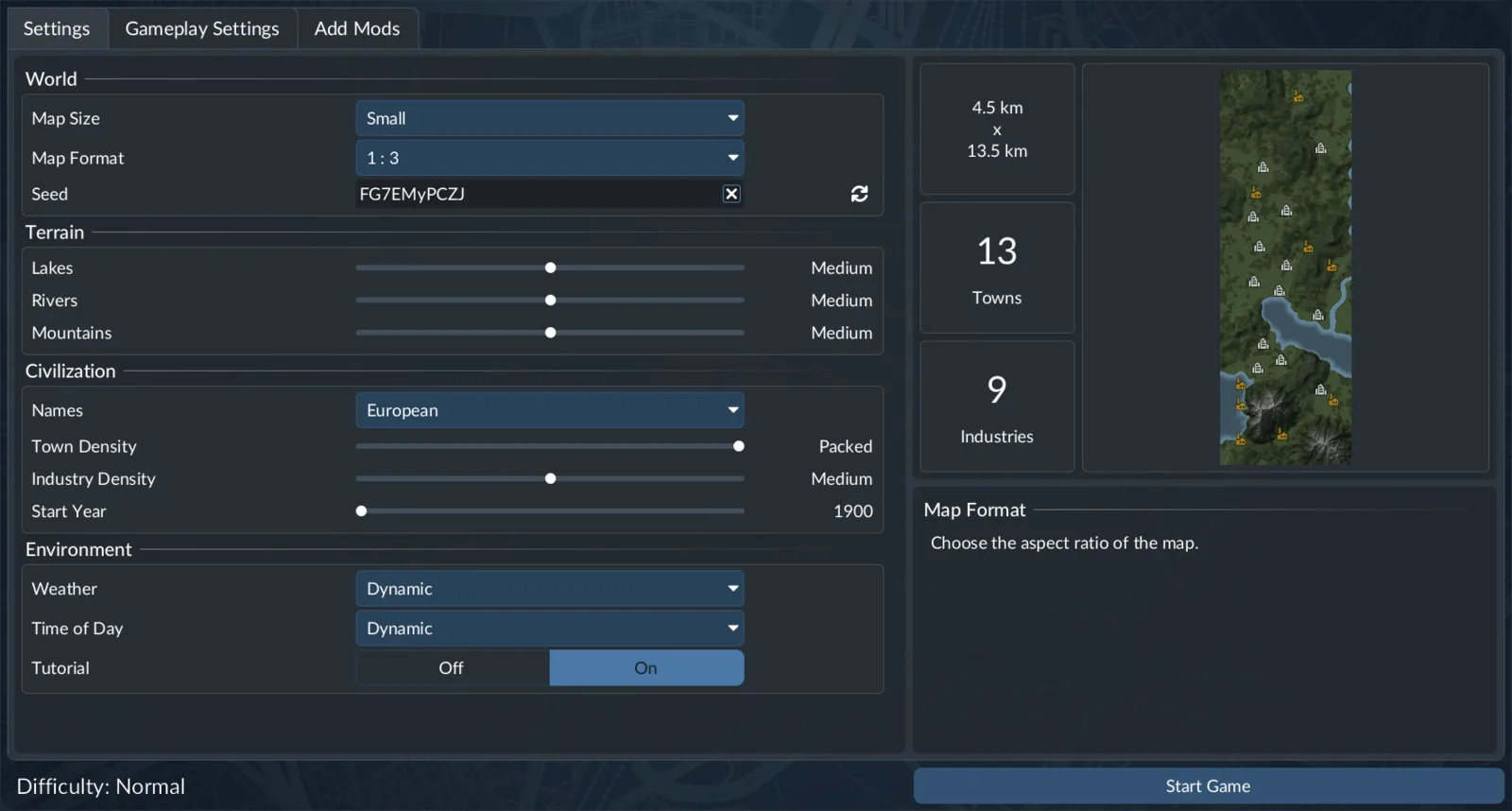
Record the seed together with the surrounding world-generation settings.
Use the following sequence when recording a Free Game setup:
- Record the seed. Keep the value unchanged in the shared record. Label it as the Free Game or map-generation seed so that it is not confused with a town-distribution seed later.
- Record the World settings. Include both Map Size and Map Format. These describe the dimensions and side ratio on which the generator operates.
- Record the selected climate. Each climate has its own map generator with individual properties, so the climate is part of the reproduction setup.
- Record the terrain generator and every visible option. Do not summarize the terrain as merely mountainous, flat, or coastal. Write down the actual selected generator and its parameter values.
- Record the Civilization settings. Include the selected name lists, Towns Density, Industry Density, and Start Year.
- Record the Environment settings when you want the same initial session setup. Weather can be Dynamic or a static Sunny, Cloudy, or Rainy setting. Time of Day can be Dynamic, Continuous, Local Time, or a static Morning, Day, Evening, or Night setting. Also note whether the tutorial is enabled.
- Record generator-changing mods. Mods can add terrain generators and their own options. A seed copied from a setup using another generator is incomplete unless that generator selection and its parameters are also identified.
Keep actual setting values in the record. A note such as “good railway map” may explain why someone likes a generated layout, but it cannot reproduce that map.
Recreate a seed in Free Game
To recreate a Free Game map, begin by selecting the recorded climate. The map-related settings then appear, including the World, Terrain, Civilization, and Environment sections.
- Match the recorded Map Size and Map Format under World.
- Enter the recorded seed in the Seed field.
- Select the same terrain generator available for that climate.
- Match every terrain slider and option included in the record.
- Match the name lists, Towns Density, Industry Density, and Start Year under Civilization.
- Match the Environment choices to keep the starting setup consistent with the record.
- Proceed with map creation and compare the result before beginning extensive construction or network planning.
The reproduction condition is the same seed with the same settings. If the result differs, first assume that part of the configuration is different or missing. Trying unrelated seed values will not diagnose a settings mismatch.
Town density deserves particular attention. A less dense setting initially produces fewer, slightly larger settlements, while a higher setting produces more individual towns with a smaller initial size. Industry density also changes the initial distribution: lower density produces higher per-industry production, while the exact number of industries also depends on population because of town demand. These are meaningful configuration choices, not optional annotations to a seed.
Reuse a seed in the Map Editor
The Map Editor exposes a Generate tab for preparing a new generated map. Its settings include a Seed textbox as well as options for retaining existing map content during regeneration.
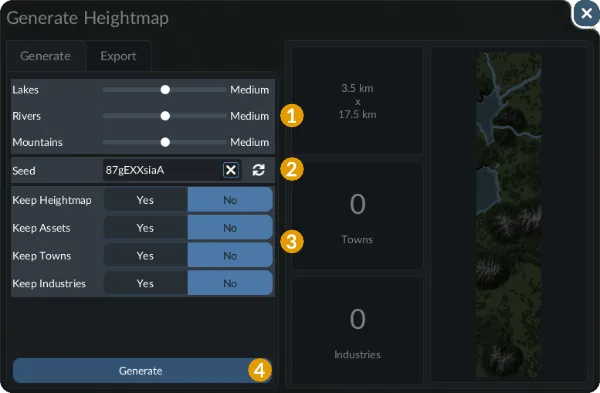
Use this panel to reproduce terrain generation and review which layers are preserved.
For a clean reproduction, select the same generation preferences, enter the same seed, and use the Generate action. The same-seed rule still depends on the same settings, including the selected terrain generator and its parameters.
The editor adds another decision: whether to preserve parts of the current map. Four options can retain content from before the new generation:
| Map Editor option | Content retained from the existing map |
|---|---|
| Keep Heightmap | The existing heightmap |
| Keep Assets | Existing assets |
| Keep Towns | Existing towns |
| Keep Industries | Existing industries |
These preservation options are part of the operation even though they are not replacements for the terrain seed. If an editor regeneration appears to contain unexpected old content, check these options before concluding that the seed failed.
For a full fresh comparison, make sure your chosen preservation state matches the original procedure. For a partial regeneration, record exactly which layers were kept. A map with a newly generated layer combined with retained layers should not be described as though every visible element came from the terrain seed.
The distinction matters when sharing editor projects. Two people may use the same terrain seed and generator configuration, but one may preserve an earlier heightmap, town layout, or industry layout. Their finished editor maps will not represent the same generation procedure.
Use separate seeds for town and industry placement
The Map Editor's town and industry generation tools are separate from terrain generation. Both tools provide properties for configuring a distribution and their own seed textbox. A terrain seed should therefore not be treated as a universal code for every procedural layer.
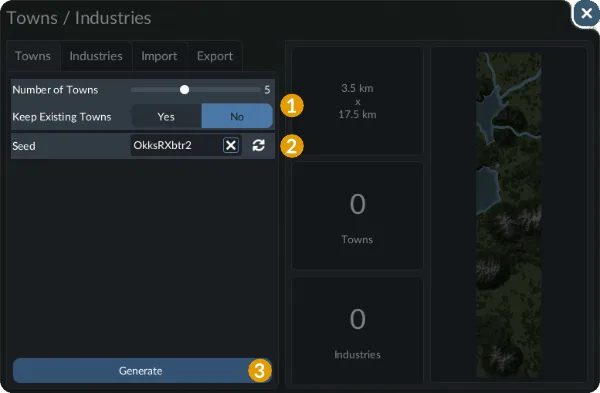
The town generator has its own seed and distribution controls, separate from the terrain seed.
For town placement, select the Towns tab, set the requested number or distribution properties, enter the town-generator seed, and inspect the preview. Generating with the same town seed and the same settings produces the same town distribution on that map.
The number setting also depends on the current map size because the maximum possible value changes with map size. This makes the underlying map part of the town-distribution context. Sharing a town seed without identifying the map and town settings is insufficient.
If towns have already been placed or distributed, the Keep existing towns option determines whether those towns are retained when the automated tool is used again. Record that choice whenever you are documenting a repeated or layered town-generation operation.
Industry generation uses settings analogous to town generation. Give its seed a separate label, such as “industry distribution seed,” and keep it distinct from both the terrain seed and the town seed. A useful editor record can therefore contain three clearly identified values:
- Terrain seed: used with the selected map generator and terrain settings.
- Town seed: used with the town-distribution properties on the current map.
- Industry seed: used with the analogous industry-distribution settings.
This separation makes a map easier to rebuild and makes troubleshooting much faster. If the terrain matches but the towns do not, there is no reason to discard the terrain seed; inspect the town-generation inputs instead.
Diagnose a seed that produces a different result
Compare the map in layers and check the settings associated with the first layer that differs.
| Symptom | Settings to verify |
|---|---|
| The terrain shape differs | Map Size, Map Format, climate, terrain generator, terrain parameters, and terrain seed |
| The general terrain matches but towns differ | Civilization town settings or the separate Map Editor town generator, including its seed and Keep existing towns choice |
| Towns match but industries differ | Industry Density or the separate industry generator settings and seed |
| Old terrain or placed content remains after editor generation | Keep Heightmap, Keep Assets, Keep Towns, and Keep Industries choices |
| The same seed works with one generator but not another | Confirm the selected climate, generator, and all generator-specific parameters |
| A shared record cannot be reproduced | Identify omitted settings instead of assuming that the seed alone defines the complete map |
Work from broad generation inputs toward narrower distribution tools. First compare the World and Terrain settings. Then compare Civilization settings. Finally, if the map was assembled in the editor, compare preservation choices and the dedicated town and industry generator records.
Do not use later manual construction as a seed comparison. A seed regenerates the random map setup; it does not recreate the transport services, construction work, manual edits, or progression added after the map was created. Compare the generated starting state before using the resulting save as a long-running game.
Keep generator-authoring seeds separate
Technical seed values also appear in generator-authoring documentation. A terrain generator may define a previewSeed used when editing that generator, while the generator's node tree can read the map seed as numerical map data. These details explain why the selected generator and its inputs matter. An authoring example is not a recommended playable world, so use the generation seed from the setup you intend to reproduce.