A working Transport Fever 3 Fish route must connect Fishing Grounds to a destination that currently accepts Fish. Load Fish at the source, carry it to a cargo-capable harbor, and then either deliver it directly to a commercial consumer inside that harbor’s catchment or transfer it through a warehouse to a separate truck line. Ports and stations do not store cargo themselves, so a ship-to-road transfer needs a connected warehouse that can accept Fish.
Check loading direction and the physical handoff separately. For the one-way delivery described here, the ship picks up Fish at the Fishing Grounds and the truck picks it up at shore-side storage. An unintended loading or fill instruction at a drop-off is one possible configuration fault; it is not proof that all destinations must forbid loading. A missing warehouse connection is a different problem.
Plan the Fish Route Before Building
Start by identifying both ends of the delivery rather than placing a port beside the nearest town and hoping demand appears.
| Route component | Required condition |
|---|---|
| Source | Fishing Grounds producing Fish |
| Water pickup | A reachable cargo-capable stop at the Fishing Grounds |
| Ship | A vehicle compatible with Fish |
| Shore destination | A valid Fish consumer or a warehouse accepting Fish |
| Road transfer | A cargo stop that can access the same warehouse |
| Final delivery | A cargo stop whose catchment includes commercial buildings requesting Fish |
Fish is a raw material in the Goods specialization. Its direct town destination is the commercial district, not any convenient residential or industrial street. Inspect the town’s supply information and individual commercial buildings before committing to the route. A commercial district may accept Fish in principle while the particular buildings covered by your stop have no open demand or are already full.
Next, decide whether the destination harbor can serve the consumer directly. If accepting commercial buildings fall inside its actual catchment, Fish may be consumed without a road transfer. If the town is farther inland, or the harbor does not cover the requesting buildings, plan a warehouse and truck leg from the beginning.
Do not treat a warehouse as the final consumer. A warehouse only stores cargo and enables transfer between vehicles. Town buildings and factories cannot pull cargo out of it by themselves; you must carry the Fish from storage to the requesting destination.
Build the Water Leg
- Select the Fishing Grounds pickup stop. Use the source’s existing cargo-capable stop and confirm that the chosen ship can reach it from the destination. Shoreline proximity at the receiving harbor is not enough if shallow or disconnected water blocks the water route.
- Place the destination harbor. Use another cargo-capable harbor at the town-facing shore. Its catchment must reach either a valid Fish consumer or the warehouse that will receive the shipment.
- Create the ship line. Add the Fishing Grounds stop and the destination harbor as two distinct stops. Check their order before assigning vehicles.
- Configure the source stop to load Fish. The Fishing Grounds is where Fish enters the route. Select Fish as an allowed cargo there.
- Review the destination’s pickup instructions. For this one-way supply route, leave Fish loading disabled at the receiving harbor. Check for any unintended Fish fill or waiting target there. These settings control pickup behavior; unloading to a reachable consumer or compatible warehouse is automatic, and a different route can deliberately collect cargo at the same stop.
- Assign a compatible ship. Verify its cargo compatibility instead of assuming every vessel can carry Fish. Then watch its first full circuit rather than waiting elsewhere for the route warning to disappear.
The first trip gives you an immediate diagnostic split. If the ship reaches the Fishing Grounds but remains empty, inspect the source stop and vehicle. If it carries Fish to town but leaves with the same cargo still aboard, inspect the destination configuration and the receiving connection.
Configure Both Lines for Fish
Each stop’s cargo selection controls what vehicles try to load there. The Fish icon in a load selector is not an instruction to unload Fish at that stop.
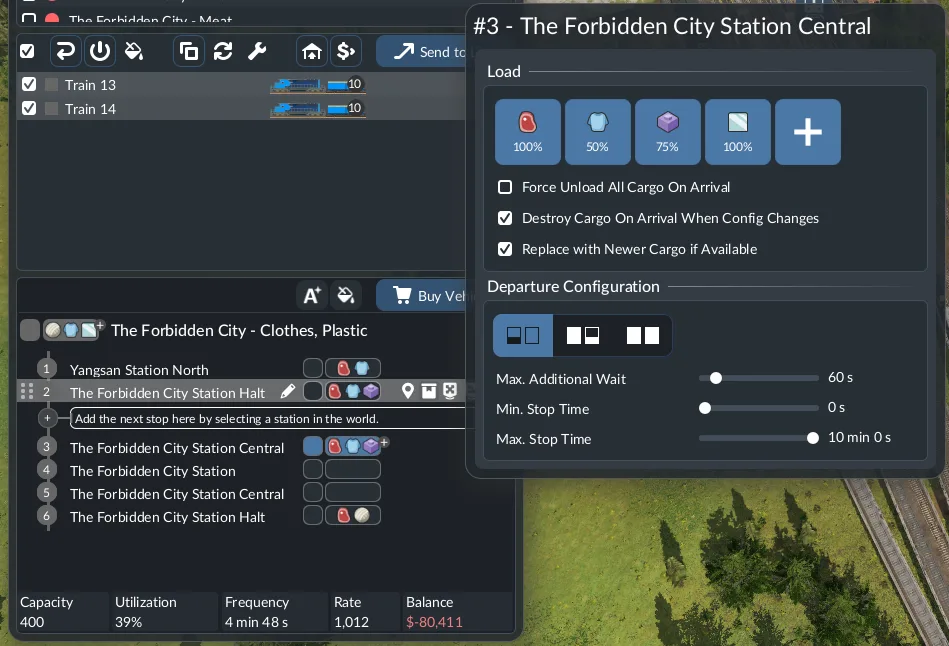
Configure pickup cargo separately at each stop; the pictured settings illustrate the controls.
Use this pickup pattern for a standard one-way ship-to-truck route. It describes this layout, rather than a ban on destination loading for every possible service:
| Line and stop | Fish loading configuration | Expected result |
|---|---|---|
| Ship line at Fishing Grounds | Fish enabled | Ship collects Fish |
| Ship line at destination harbor | Fish not selected for loading | Ship can deliver to a reachable receiver |
| Truck line at harbor warehouse | Fish enabled | Truck collects transferred Fish |
| Truck line at commercial district | Fish not selected for loading | Truck delivers instead of carrying Fish back |
For initial testing, use a departure mode that lets a compatible vehicle leave when cargo is available. A full-load setting can make a valid line look broken while the vehicle waits for more Fish. Once the route works, you can adjust waiting behavior to suit its production and travel pattern.
Build the Harbor Handoff
A ship-to-road transfer requires one shared storage point because the harbor and cargo station do not store Fish themselves.
- Place a Fish-compatible warehouse near the destination harbor. It does not require its own road access, but it must be inside the harbor’s catchment.
- Place a truck cargo stop that reaches the warehouse. The same warehouse must also fall inside this stop’s catchment. A short visual distance does not prove that the buildings are connected.
- Inspect the connection highlight or incoming display. Use the game’s connection feedback to verify both sides of the handoff. Do not rely on an assumed universal radius.
- Open the warehouse stock or filter panel. Confirm that it has a free slot able to accept Fish. If a module is occupied by or filtered for another cargo, configure an available module for Fish.
- Create a separate truck line. Its pickup stop must access the warehouse, while its destination stop must cover commercial buildings with open Fish demand.
- Assign a Fish-compatible truck. Watch whether Fish moves from warehouse stock onto that vehicle.
If the harbor itself covers an accepting commercial building, Fish may be consumed directly and never appear in warehouse stock. Check the consumer’s delivery state before declaring the warehouse connection broken. The warehouse becomes essential when the cargo must change lines, not when a valid consumer already receives the ship’s delivery directly.
Choose the Right Warehouse for Fish
A universal warehouse is a flexible option because it can hold a mixture of cargo types. A Goods-specialized warehouse or module is the matching specialization for Fish. Specialization can improve loading and unloading speed, and a specialized warehouse module freezes the stored cargo’s delivery timer.
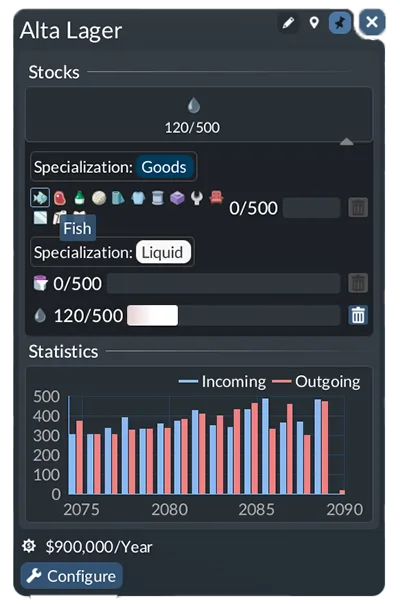
Choose Fish for the Goods module used by the handoff.
Do not assume that every warehouse freezes that timer. The timer benefit belongs to specialized storage. Inspect remaining delivery time in the warehouse Stocks view and keep the onward transfer moving.
Specialized storage also has a stricter slot rule. A module holds only one cargo type at a time, even when several products share the Goods category. If the receiving module is already assigned to another product, Fish needs another available module or a corrected filter.
For a simple route, choose between the two options based on the job:
- Use a universal warehouse when you need flexible mixed storage and can keep the transfer moving reliably.
- Use a Goods-specialized module when Fish is an important dedicated flow and the specialization benefits matter to the route.
- In either case, verify the Fish filter, free storage, harbor catchment, and truck-stop catchment separately.
A warehouse beside the harbor but outside its catchment cannot receive the shipment. A warehouse connected to the harbor but not the cargo stop can receive Fish yet leave the trucks empty. Both connections must exist for a complete handoff.
Complete the Truck Delivery
The road leg has one job: take Fish from the harbor-side warehouse to commercial buildings that are requesting it.
Place the destination cargo stop so its catchment includes those specific buildings. Being somewhere inside the colored commercial district is not sufficient if the requesting buildings remain outside the stop’s coverage. Inspect the stop catchment and click individual buildings when demand is unclear.
For this one-way truck leg, configure Fish loading at the warehouse-side pickup and leave it disabled at the town drop-off. If Fish comes back on the truck, inspect unintended destination loading or waiting instructions, the stop’s consumer coverage, and whether receiving buildings already have their demand filled. The return load alone does not identify which condition failed.
After assigning a compatible cargo vehicle, follow it from pickup to drop-off. A completed road line is not proven merely because the truck visits both stops. Confirm that Fish leaves warehouse stock, appears on the truck, disappears at the commercial stop, and counts as a delivery to an accepting building.
Fishing Grounds produces Fish without a required cargo input. Workers and Tools are optional boosters, so they do not replace checking available output, source access, ship compatibility, and Fish pickup selection when a vessel stays empty.
Fix Fish That Will Not Move
The ship reaches the Fishing Grounds empty
Confirm that Fish is enabled at the Fishing Grounds stop rather than at the destination harbor. Check that the vessel can carry Fish and that it can physically reach the source. If the line warning says Fish cannot be loaded anywhere, the pickup selection or source access is the first place to inspect.
Do not use a larger ship as the first fix. Capacity does not correct a reversed stop configuration, an incompatible vehicle, or an unreachable source.
Fish loads but stays on the ship at town
Inspect unintended Fish loading or fill targets at the destination. Clear them if they conflict with the intended one-way drop-off, then watch another arrival. Also verify a reachable consumer or warehouse accepting Fish: the loading selection alone does not prove why unloading failed.
Confirm that the destination facility is cargo-capable. If it is, inspect its catchment rather than estimating the distance to storage. The ship cannot unload merely because a warehouse is visible nearby.
The ship unloads but the warehouse stays empty
First check whether a nearby commercial consumer received the Fish directly. If direct consumption occurred, an empty warehouse is expected.
If no consumer received it, inspect the harbor-to-warehouse connection and the warehouse’s Fish slot. Confirm that the relevant module is not occupied by another cargo or filtered incorrectly. One successful unload followed by a stalled route does not identify a single universal fault; check current demand, available storage, and both stop configurations again.
Fish reaches storage but trucks remain empty
Verify that the truck cargo stop can access the same warehouse. Then enable Fish loading at that pickup stop and confirm the assigned truck supports the cargo. A harbor connection alone does not make stored Fish available to an unrelated road stop.
If everything is connected, watch the warehouse stock and truck together. This reveals whether Fish never becomes available at the stop or whether the vehicle visits but cannot load it.
Trucks carry Fish back from the commercial district
Remove Fish from the town stop’s load selection and clear any Fish fill target there. Check that the stop covers buildings that actually request Fish. Click the receiving buildings to see whether their demand is already full.
A road stop can be inside the commercial area yet miss the relevant buildings. Reposition or replace the stop only after verifying its coverage, because rebuilding the entire line will not correct a local catchment gap.
Every visible stage works but delivery still fails
Record the line warnings, source and destination cargo settings, warehouse stock panel, connection highlights, and receiving-building demand. Those states separate a reproducible route problem from an unseen configuration error. There is no supported universal Fish bug or universal catchment radius to assume when the visible chain appears complete.