
To improve vehicle maintenance in Transport Fever 3, identify the vehicles with poor condition, inspect their condition history, and check whether their actual route passes through an appropriate maintenance area. A depot provides a small maintenance radius; a dedicated maintenance building serves a larger area but cannot sell vehicles. Coverage alone is not enough: compare the vehicles being maintained with the facility's current Usage and capacity, then watch the affected vehicle's condition after it passes through the area.
Use the values shown in your current save to decide whether the arrangement works. There is no single building count or placement pattern that suits every route. Aircraft also need separate consideration because they do not have dedicated maintenance buildings.
Find the Vehicles That Need Attention
Start in Vehicle Statistics rather than building maintenance facilities across the map. The table includes each vehicle's line, condition, age, and problems. Read Condition to locate the vehicles that need attention, and use Line to connect those vehicles to their routes. Problems displays warnings that may require a separate check.
A route with one poorly maintained vehicle needs a different investigation from a route where several vehicles show the same decline. With a single vehicle, inspect its own history and current location first. With several affected vehicles on the same line, examine the route's relationship to the available maintenance areas. This comparison narrows the work to the vehicles and infrastructure involved.
Age is useful context, but it does not replace the condition reading. The displayed age is relative to the current calendar speed. Avoid treating a particular age as an automatic maintenance deadline or assuming that every older vehicle must be replaced. The immediate maintenance question is what condition the vehicle has now and how that condition changes while it operates.
Select an affected vehicle and inspect its Condition section. Both parts can be expanded:
- The upper section shows the vehicle's maintenance history.
- The lower section shows model information and current modifiers to its statistics, including modifiers caused by condition.
Read these together. A low current condition tells you that attention is needed; the history helps you see whether the vehicle has been recovering or continuing to decline. The modifiers show the practical effects on that vehicle instead of requiring you to guess how much performance it has lost.
Poor maintenance can affect speed, comfort, and efficiency, and can increase noise and pollution. Use the current modifier display to judge the affected model. Do not attach a fixed penalty to every vehicle or mistake a condition-related speed reduction for a signal or traffic problem.
Choose Between a Depot and a Maintenance Building
Depots and dedicated maintenance buildings have different purposes. Choose the facility around the task you need it to perform, rather than assuming that every depot is interchangeable with a maintenance station.
| Facility | Vehicle purchase | Maintenance role |
|---|---|---|
| Depot or shipyard | Vehicles can be bought here | Repairs nearby vehicles within a small maintenance radius |
| Dedicated maintenance building | Cannot sell vehicles | Provides an extended maintenance radius for passing vehicles |
Dedicated maintenance buildings are available from the same construction menus as depots. A depot makes sense when you need a vehicle purchase point as well as its maintenance coverage. When the route already has suitable purchasing infrastructure, examine whether a dedicated maintenance building better serves the section used by the affected vehicles.
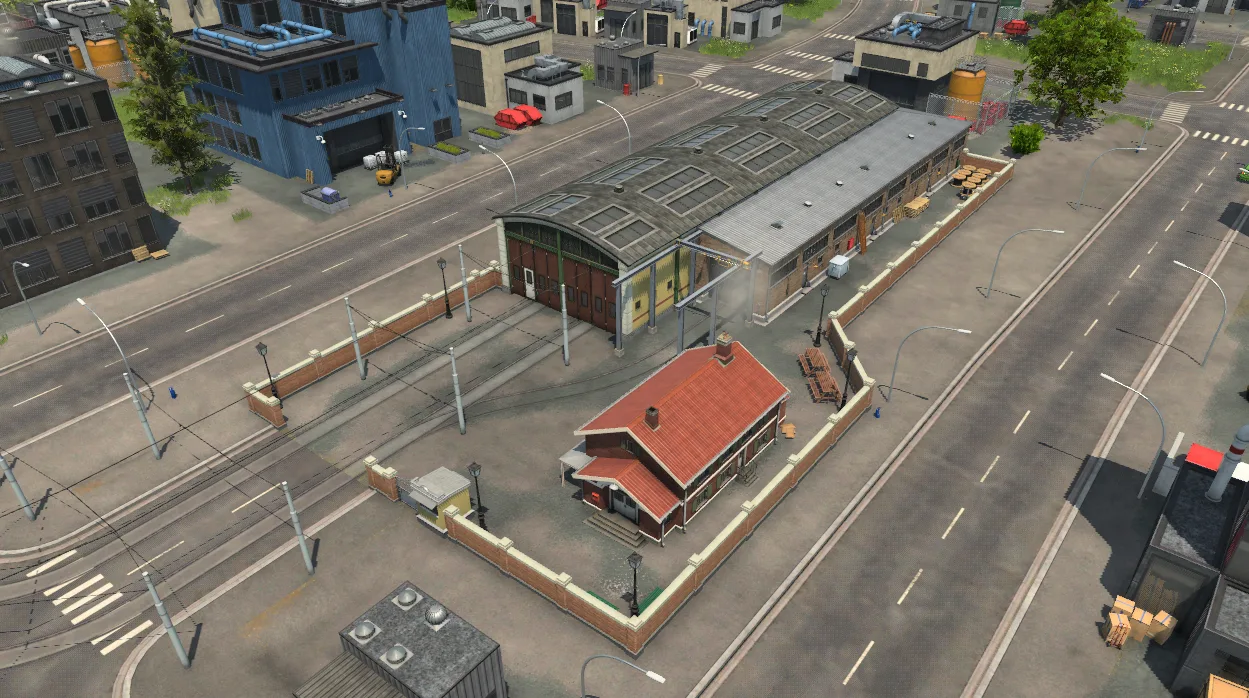
The depot has tram-track access from the surrounding street network.
Keep transport type in mind. Aircraft are bought in hangars that are part of airports, while helicopters are bought in the special hangars at heliports. Aircraft do not have dedicated maintenance buildings. Do not plan an aircraft repair solution around placing a separate maintenance building beside an air route.
For a depot used to buy vehicles, access to the line is another requirement. A rail, road, or tram depot needs a connection to the corresponding network so that a purchased vehicle has a valid path to its line's first stop. A shipyard needs navigable water and a navigable path to that first stop. Those purchasing requirements are separate from checking whether operating vehicles pass through a maintenance radius.
Place Coverage Where the Route Actually Passes
A maintenance building can look close to a line without serving its vehicles. Follow an affected vehicle along the route and compare its path with the maintenance area. Check the path it actually uses, including its approach to a station and its departure, rather than judging coverage from the distance between the building and the station name.
Stations and slower approaches are useful places to consider because vehicles spend longer in that part of the route than on a stretch they cross at full speed. A route end can also be worth inspecting when vehicles approach, turn back, and pass through the same area again. These are placement options to evaluate against the condition history, not a promise that one building at any terminus will fully repair every vehicle.
The practical construction sequence is:
- Select the appropriate depot or maintenance building from its construction menu.
- Preview a location beside the route section you intend to serve.
- Adjust the orientation and height so the building fits the available site.
- Read any warnings and check whether construction would demolish existing buildings.
- Build only after the preview gives you an acceptable placement and cost.
On keyboard controls, M and N adjust rotation, while the comma and period keys adjust height. Holding Shift makes those steps smaller. Rotation can also be changed by holding Shift and the left mouse button while moving the cursor sideways.
Depots and maintenance buildings snap to tracks or streets, and the landscape adjusts when they are built. If the preview highlights buildings in yellow for demolition, the demolition cost is added to the displayed construction cost and a warning appears. Move or rotate the proposed facility if that site would remove infrastructure you still need.
Do not begin by trying to cover the entire route with buildings. First check whether the existing maintenance passages keep the affected vehicles in a satisfactory condition. A long uncovered section does not, by itself, establish that another facility is needed; the vehicle's history and modifiers show whether the current arrangement is failing.
Check Concurrent Usage Before Adding More Coverage
Open Depot Statistics to inspect the facilities serving the affected route. This table covers vehicle depots and maintenance stations. It separates vehicles parked at a facility from vehicles currently being maintained, and it displays current usage, capacity, and infrastructure upkeep.
| Field | What to read | How it helps the maintenance check |
|---|---|---|
| Name | The individual depot or maintenance station | Identify the facility near the affected route |
| Parked | Vehicles currently parked there | Distinguish parked vehicles from active maintenance |
| Maintained | Vehicles currently being maintained there | Check whether the affected vehicles are actually receiving maintenance |
| Usage | Vehicles currently maintained and total maintenance capacity | Compare the current workload with the facility's available capacity |
| Upkeep | Infrastructure upkeep costs | Review the cost of the maintenance arrangement |
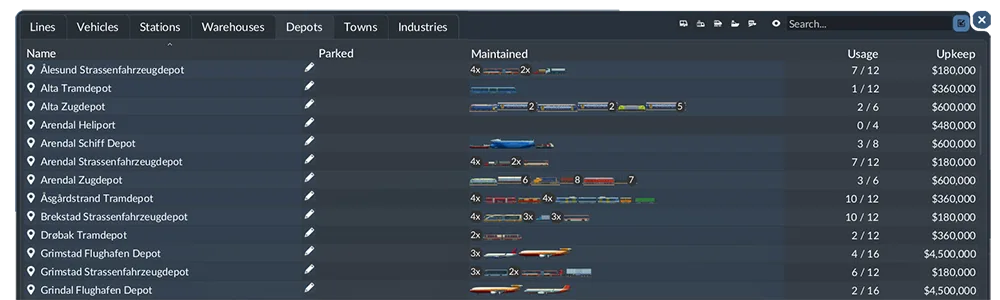
Use the depot statistics table to compare parked vehicles, maintenance activity, capacity usage, and upkeep.
Usage is a current reading. Check it while the relevant vehicles are passing through the facility's area, especially when several arrive together. A quiet snapshot taken when the line's vehicles are elsewhere does not tell you how much maintenance demand the facility faces at the busy part of their trip.
Likewise, an empty Parked field does not show that maintenance is absent. Nearby operating vehicles can receive maintenance within the radius, and Maintained is the field that identifies the current maintenance activity. Use the two columns for their separate purposes.
If poor-condition vehicles pass through the service area while Usage is at the displayed capacity, capacity deserves attention before you decide that the radius is the only problem. If there is capacity available but the affected vehicles never appear under Maintained during that passage, inspect their actual path and coverage again. The building's presence and its total capacity cannot establish that a particular vehicle is being served.
Avoid transferring a capacity number from another facility or save to your network. Read the current facility's own Usage value. After making a change, revisit the same part of the vehicles' trip so that the comparison concerns the maintenance demand you were trying to solve.
Use Waypoints When the Shortest Route Misses Maintenance
Trains, street vehicles, and ships use the shortest route between stops. If your maintenance area lies beside a different usable path, simply constructing the building does not direct the line through it. Inspect the line's route before changing the facility again.
Waypoints let you influence the path. Place a suitable waypoint and add it to the line's stop list, in the sequence where the vehicle should pass it. The vehicle is obligated to visit the waypoint, so a waypoint outside the previous shortest route can change the route between stops. Vehicles do not stop at waypoints.
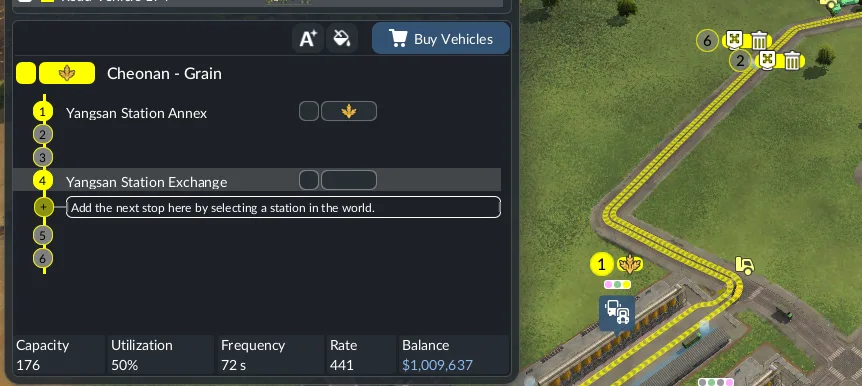
A waypoint can direct a line through a maintenance area without adding a station stop.
For a maintenance adjustment, the waypoint's purpose is to lead the vehicle through the intended service area. Check the resulting route after adding it. A waypoint that leaves the vehicle on the same path will not solve a maintenance area that the path still misses.
Keep the change focused on access. A detour may bring vehicles closer to a facility, but the maintenance result still depends on the actual passage and the available capacity. Watch the affected vehicle after the route change instead of assuming that the waypoint itself establishes adequate maintenance.
Diagnose a Maintenance Arrangement That Still Fails
The Vehicle Never Appears as Maintained
Compare its position with the facility's service area while it passes. If it uses a different road, track, or approach from the one you expected, correct the placement or route that caused the mismatch. Check the line's route between stops; shortest-route behavior can explain why a nearby facility is being bypassed.
Also inspect Usage at that moment. A facility without available capacity calls for a different response from a facility whose radius the vehicle never enters. Changing the route cannot, by itself, demonstrate that concurrent capacity will be sufficient when the other vehicles arrive.
Condition Improves Briefly but Declines Later
Expand the maintenance history and follow the vehicle farther along its trip. A rise during one maintenance passage followed by a later fall is different from no recovery at all. Consider whether the vehicle crosses the available area too quickly, whether the chosen location serves a useful part of its trip, and whether capacity is available during that visit.
A station approach or route end may offer a better placement to investigate than a fast through section. Confirm the change through the same vehicle's history. There is no need to replace that observation with an assumed repair duration or a requirement that maintenance areas overlap along the entire route.
Only Some Vehicles on the Line Recover
Compare the affected vehicles' current maintenance activity and timing. The line name alone does not establish that every vehicle is receiving the same service at the same moment. Look at which vehicles appear under Maintained and how Usage changes during their passages.
Then inspect each poor-condition vehicle's modifiers. This keeps the diagnosis tied to its actual condition rather than to a fleet average that can hide the vehicles still struggling. Check the facility during the relevant arrivals before deciding whether to change coverage, capacity, or the route.
Confirm the Result Before Expanding the Arrangement
Return to the vehicle you used for the initial diagnosis. Watch its condition history after it travels through the revised maintenance area, and read the current modifiers again. The useful result is observable recovery that persists well enough through its normal trip to address the condition problem you identified.
Check Depot Statistics during that maintenance passage to confirm which facility is serving it and whether other vehicles are competing for the displayed capacity. If the line has several affected vehicles, repeat the observation for those vehicles rather than treating one recovery as proof for the whole fleet.
Finally, review the infrastructure Upkeep alongside the coverage you are using. Keep a placement that addresses the condition problem; reconsider additional buildings whose role you cannot establish from the vehicles' maintenance activity. A lower condition warning, its history, and the facility's live workload provide a concrete basis for the next adjustment without imposing a universal replacement schedule.